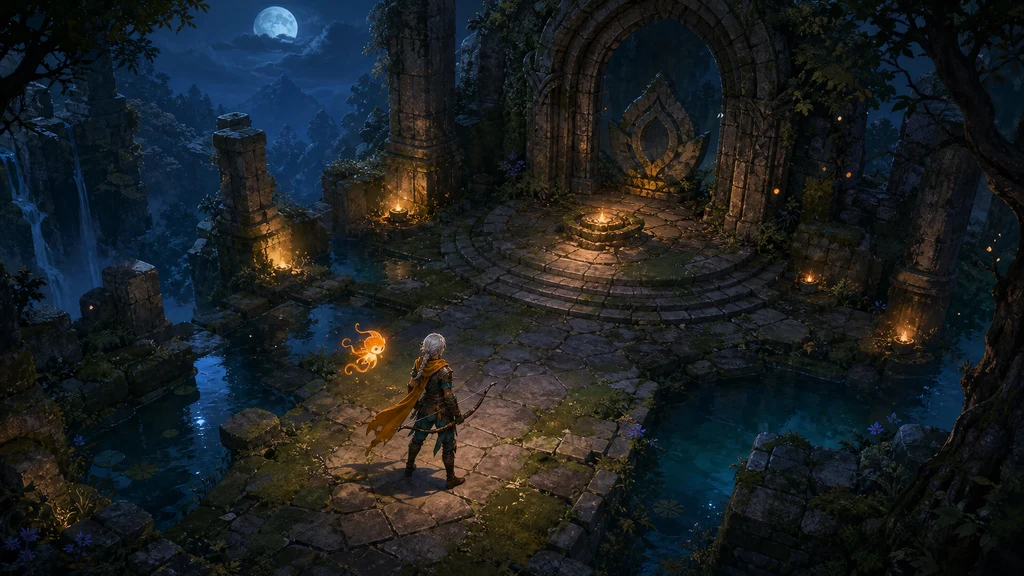
Making game assets with AI images does not mean turning one prompt into finished production art. The reliable approach is to use AI for rapid visual exploration and structured drafts while a human remains responsible for specifications, consistency, alpha cleanup, animation, collision, performance, and rights.
This guide builds one original 2D action-RPG world through an art-direction board, a character sheet, inventory icons, and a modular environment kit. Every illustration includes its production prompt. The final sections explain what must be checked before the files enter Unity, Unreal Engine, or Godot.
This article reflects official Unity 6, Unreal Engine 5.8, Godot 4.x, Steamworks, and U.S. Copyright Office materials checked on July 28, 2026. Model terms and editor interfaces can change. Recheck current policies before production and release. This is not legal advice.
1. Define the game specification before generating images
“Make beautiful game assets” leaves the camera, scale, lighting, and density undefined. Lock five decisions in a short production brief first.
| Decision | Example | Why it matters |
|---|---|---|
| View | top-down three-quarter | keeps character and tiles in one perspective |
| Base scale | 128px character, 64px tile | makes screen density and collision predictable |
| Color script | teal/indigo shadows, amber accents | unifies separate generations |
| Material rules | rough stone, worn leather, muted metal | creates reusable descriptive language |
| Output role | concept, sheet, icon, tile | prevents one image from doing several jobs |
Unity's official Sprite Import Settings distinguish a Single sprite from a Multiple sheet containing poses or tiles, and Pixels Per Unit defines the relationship between image pixels and world units. In other words, decide how the engine will slice and scale an asset before writing its prompt.
2. Lock the visual language with an art-direction board
The first deliverable is a visual contract, not a poster. Put the hero silhouette, signature prop, five to seven colors, surface materials, and representative lighting on one board. Use the approved board as the first reference for later generations.
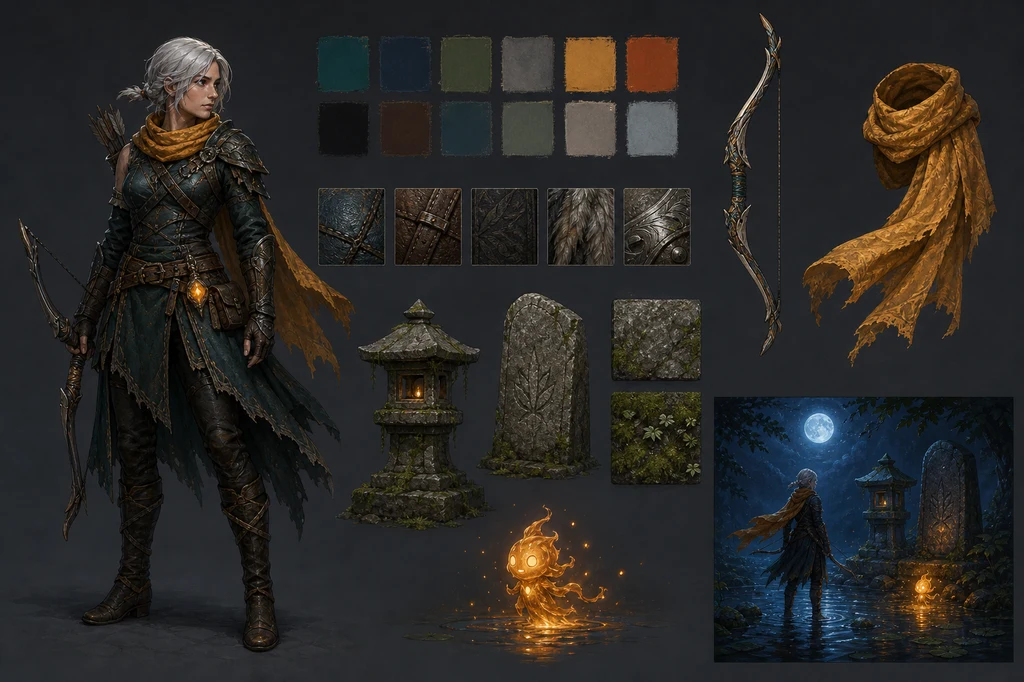
Image-generation prompt
Use case: stylized-concept
Asset type: game art-direction style bible board, landscape
Primary request: Design a clean visual style bible for the same original moonlit action-RPG world: an adult female ranger with a short silver braid, saffron scarf, dark teal leather armor and ashwood bow; a tiny amber ember spirit; mossy shrine stone; shallow water; blue moonlight; warm embers. Show one full character silhouette, small material swatches, color chips represented only as unlabelled painted squares, bow and scarf callouts, stone and moss samples, and a compact lighting vignette.
Style/medium: premium hand-painted 2D game concept art, stylized realism, coherent production design
Composition/framing: organized landscape concept board with generous spacing and a clear visual hierarchy; each element isolated and fully visible
Lighting/mood: neutral presentation lighting on assets, with one cool-blue versus amber lighting vignette
Color palette: deep teal, indigo, moss green, saffron, ember orange, weathered gray stone
Constraints: exactly one full adult ranger depiction plus small non-character callouts; maintain the defined costume and proportions; no text, no letters, no numbers, no logos, no watermark, no recognizable franchise, no decorative typography, no extra people
A strong board succeeds by limiting choices. This example uses deep teal, indigo, moss, saffron, and amber, with weathered silver instead of polished chrome. Describe observable properties—materials, contrast, brush density, and camera—rather than asking to copy a living artist or an existing commercial game.
3. A character sheet is a consistency test
For a playable character, structural continuity across front, side, and back views matters more than one flattering portrait. Keep every body fully visible, use neutral light and a simple background, and separate turnaround views from action poses.
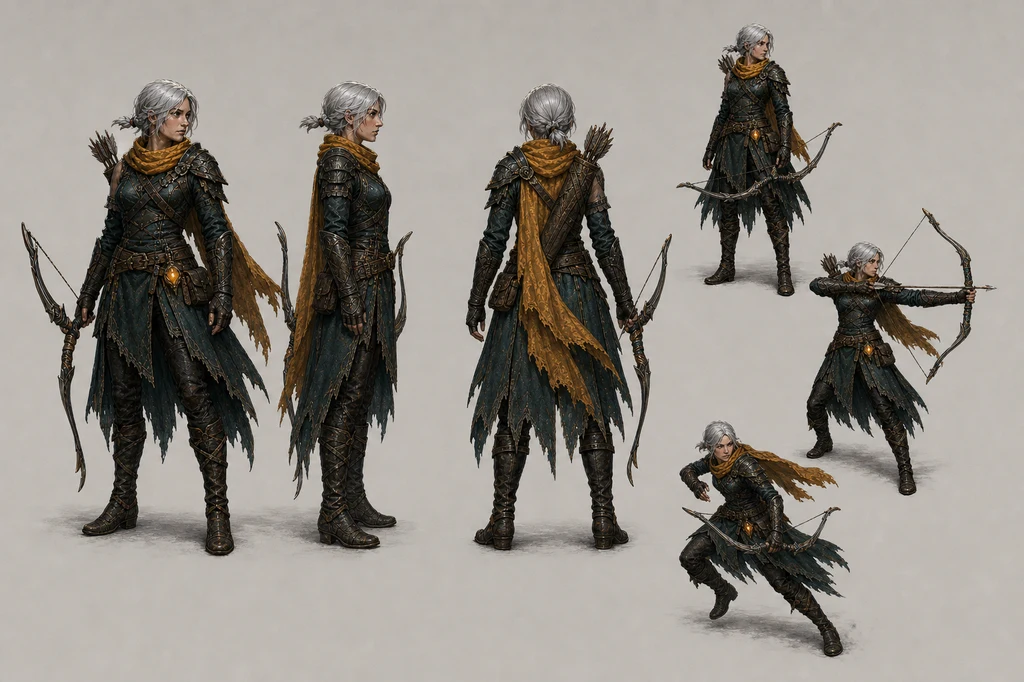
Image-generation prompt
Use case: stylized-concept
Asset type: production game character turnaround and action-pose sheet
Input images: Image 1 is the approved style and identity reference; preserve the adult female ranger's short silver braid, facial structure, saffron scarf, dark teal layered leather armor, boots, quiver, and ashwood bow.
Primary request: Create a clean character production sheet for that same original adult ranger. Show three full-body orthographic turnarounds—front, side, back—plus three smaller gameplay poses: idle with bow lowered, drawing an arrow, and a short evasive step. Keep costume construction and body proportions identical in every view.
Scene/backdrop: plain warm light-gray studio board with subtle grounding only
Style/medium: hand-painted 2D game character concept art, stylized realism, crisp readable silhouette, production reference quality
Composition/framing: landscape sheet, evenly spaced figures, every body and weapon fully visible, no overlapping crops
Lighting/mood: neutral diffuse studio lighting; no dramatic environment lighting
Color palette: same deep teal, worn leather brown, saffron and muted steel from the reference
Constraints: one adult character identity repeated as design views, not multiple distinct people; consistent face, hairstyle, costume, bow size and proportions; no text, no labels, no arrows, no logos, no watermark, no environment, no extra characters, no distorted hands or duplicated weapons
Zoom in and compare face shape, hair length, shoulder plates, belt count, bow length, and quiver position. If one view drifts, revise that view from the approved anchor instead of regenerating the entire sheet. Build animation frames separately on a uniform grid with a fixed ground line and pivot.
4. Inventory icons prioritize readability and grid discipline
An icon must be recognizable within a second at small size. Keep camera angle, light direction, outer padding, and background value consistent. Place one object in each cell and render names and quantities in the game UI rather than baking text into generated art.
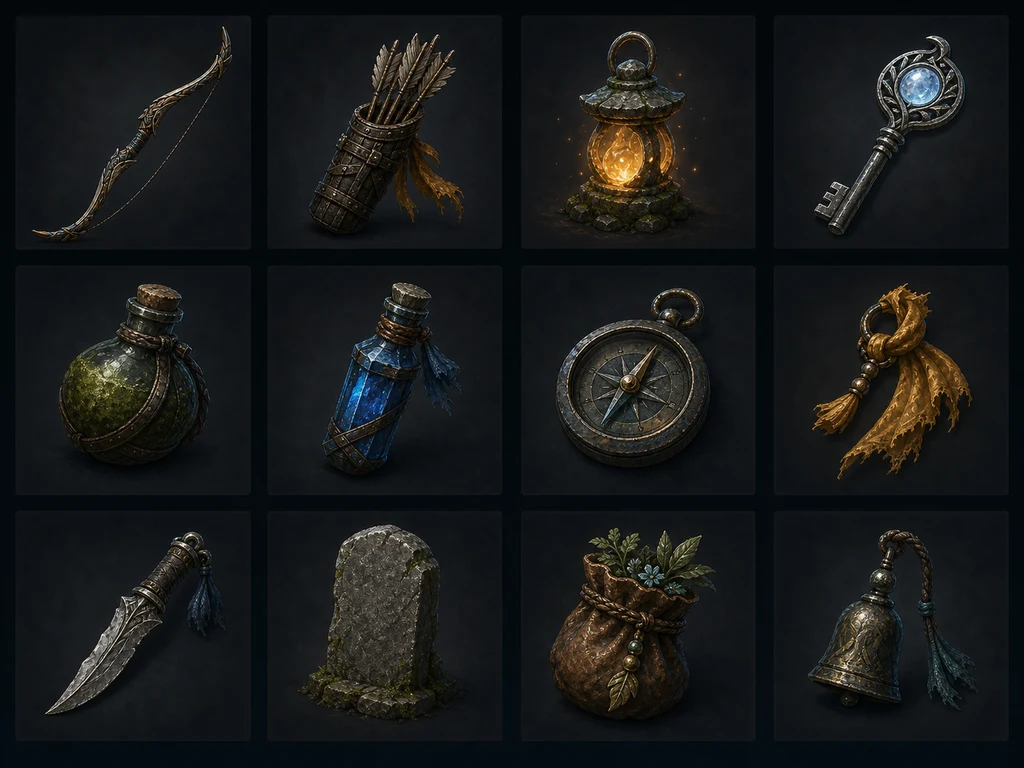
Image-generation prompt
Use case: stylized-concept
Asset type: production-ready game inventory icon and prop sheet
Input images: use the approved art-direction and character references only for material, color, scale, and bow design; do not include the character.
Primary request: Create a precise 4 by 3 grid of twelve original inventory assets for the same moonlit shrine action-RPG: ashwood bow, bundled arrows, amber spirit lantern, moonstone key, moss-covered health flask, blue mana vial, weathered field compass, saffron cloth charm, silver leaf dagger, rune-free stone tablet, leather herb pouch, and a small shrine bell. Each object must appear exactly once.
Scene/backdrop: twelve separate dark neutral square cells with consistent margins and no decorative scenery
Style/medium: hand-painted 2D game inventory icons, stylized realism, production-ready silhouettes, consistent three-quarter view, controlled material highlights
Composition/framing: exact 4 columns by 3 rows, one centered item per cell, generous padding, no overlap, identical visual scale where practical
Lighting/mood: cool rim light with a restrained warm amber key light, consistent across all cells
Color palette: deep teal, weathered brown, moss green, saffron, silver, amber, moonlit blue
Constraints: exactly twelve distinct items and no duplicates; no people, no hands, no creatures, no text, no labels, no numbers, no runes that resemble writing, no logos, no watermark, no border ornaments, no recognizable franchise| Check | Pass condition |
|---|---|
| Duplicates | every requested object appears exactly once |
| Silhouette | bow, key, and flask remain distinct at 64px |
| Padding | cells have comparable visual scale and margins |
| Lighting | highlights and shadows come from one direction |
| Alpha | no dark halo, white fringe, or translucent noise |
Slice the final sheet into individual cells and keep a clean transparent source format. WebP is efficient for web previews, but the runtime source format should follow the target engine, platform, and build pipeline.
5. Environment tiles are connection rules, not a pretty scene
Request floor bases and variants, straight and corner water edges, walls, stairs, and isolated props rather than a finished dungeon illustration. Perspective, footprint, texel density, and edge height must match before the pieces can form a level.
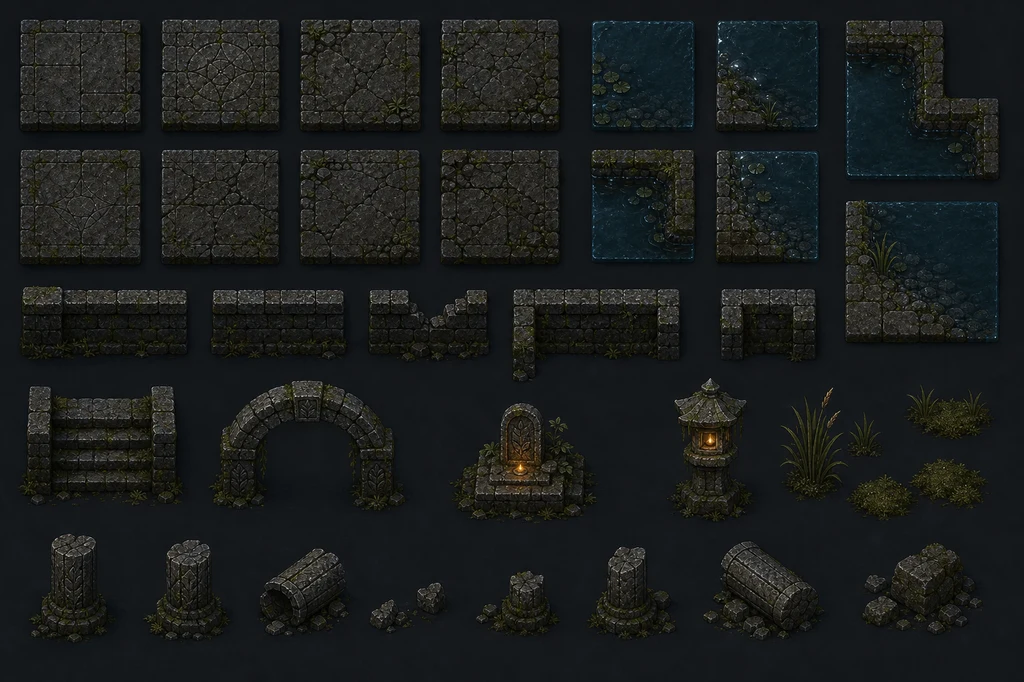
Image-generation prompt
Use case: stylized-concept
Asset type: modular top-down game environment tileset and prop kit
Input images: use the approved game art references only for the moonlit shrine world's palette, mossy stone, water, amber lighting and material finish; do not include the ranger.
Primary request: Create a production concept sheet of modular environment pieces for the same original 2D action-RPG. Include square mossy floor tiles, cracked floor variants, shallow-water edge and corner tiles, straight and broken stone walls, a stair segment, one arch segment, a low altar, a stone lantern, small reeds, moss clusters, and broken-column props. Every module must be visually compatible and capable of assembling into the shrine environment.
Scene/backdrop: clean neutral charcoal presentation board
Style/medium: hand-painted 2D game tiles and modular props, stylized realism, consistent top-down three-quarter camera and texel density
Composition/framing: organized landscape sheet with a strict modular grid, generous gaps between pieces, each module fully visible, orthographic-like presentation, no completed scene
Lighting/mood: neutral cool moonlight with restrained amber emissive accents only on lantern and altar
Color palette: weathered gray stone, deep teal water, moss green, indigo shadow, amber glow
Constraints: consistent tile footprint, perspective, edge alignment, scale and material language; no characters, no creatures, no text, no labels, no numbers, no logos, no watermark, no recognizable franchise, no decorative border, no overlapping pieces
An AI sheet can look modular while its edge pixels do not actually connect. Normalize the cells in an image editor, preview horizontal and vertical repetition, and test every water-corner combination. Keep decorative props separate from collision-bearing architecture.
Current Unreal texture guidance recommends power-of-two sizes where practical because they support mipmapping and streaming. Paper 2D can extract a sprite sheet into individual Sprites and use TileSets to construct environments. Godot recommends lossless compression for common 2D assets and pixel art, and warns that VRAM compression can damage low-resolution pixel art without meaningful benefit.
6. Human finishing is mandatory before engine import
| Stage | Human task | Failure if skipped |
|---|---|---|
| Cleanup | remove background, fringes, stray pixels | visible halos and noise |
| Normalize | align canvas, PPU, pivot, and grid | scale and foot placement drift |
| Animate | preserve body and equipment volume | hands and weapons mutate |
| Tile | test every edge and repeat | seams appear in the level |
| Optimize | inspect atlases, compression, mips, memory | blurry art or oversized builds |
| Gameplay | validate collision and readability | art disagrees with play |
In Unity, set Texture Type to Sprite, choose Single or Multiple, then apply a consistent Pixels Per Unit. Unreal Paper 2D can extract frames from a PNG sprite sheet with alpha and adjust pivots and collision in the Sprite Editor. In Godot, review compression, filtering, and repeat settings according to the intended pixel style.
7. The thumbnail shows how the asset family assembles
Individual sheets cannot prove that scale and color work together. Finish with a target scene that combines character, tiles, props, and lighting under one camera. The following prompt produced this article's representative image.
Thumbnail-generation prompt
Use case: stylized-concept
Asset type: 16:9 blog thumbnail and finished 2D action-RPG gameplay key art
Primary request: Create an original polished game scene for a fictional project called only conceptually Emberfall; do not render any title or words. An adult female ranger with a short silver braid, a saffron scarf, dark teal leather armor, and an ashwood bow stands in a moonlit ruined shrine while a small amber ember spirit floats beside her. Mossy stone tiles, broken arches, shallow water, blue moonlight and warm magical embers establish a coherent production-ready art direction.
Style/medium: premium hand-painted 2D game art with stylized realism, readable top-down three-quarter gameplay camera, crisp silhouettes, restrained painterly texture, believable game-environment scale
Composition/framing: wide 16:9 landscape, player character near lower center, a ruined altar as the focal point, navigable floor shapes and foreground-to-background depth; no cinematic letterbox
Lighting/mood: cool indigo moonlight contrasted with warm amber particles, mysterious but inviting
Color palette: deep teal, moonlit blue, moss green, saffron, ember orange
Constraints: original characters and setting; exactly one adult ranger and one small ember spirit; consistent proportions; no text, no logos, no watermark, no recognizable franchise, no photorealism, no UI labels, no gibberish glyphs
Treat it as a visual target, not a shipping screenshot. In actual gameplay, traversable ground, enemies, projectiles, and interactive objects must read more clearly than decoration. Rebalance the cinematic lighting during playtesting.
8. Rights and disclosure records belong in the asset pipeline
Record the model, use date, terms URL, source of every reference, prompt, raw output, human-edited file, and approver. Steamworks' official Content Survey asks developers to describe AI-assisted content that ships with and is consumed by players as Pre-Generated AI content. Live generation also requires describing guardrails against illegal output.
The U.S. Copyright Office's 2025 report says protection may exist where a human determines sufficient expressive elements, while merely providing prompts is not enough by itself. Laws vary by jurisdiction, but documenting human selection, arrangement, and modification is a sound production practice.
Release checklist
- Verify current commercial-use and output terms for the model.
- Avoid deliberate copies of third-party characters, logos, UI, trademarks, or identifiable styles.
- Preserve licenses for every input image, font, brush, and texture.
- Archive raw generations and each human-edited version.
- Complete storefront AI-content disclosures accurately.
- Test readability, memory, compression, and frame performance on target hardware.
Conclusion: use AI as a fast art collaborator, not an asset factory
AI image generation is strongest at exploring many directions and expanding an approved visual language into characters, props, and environments. Production quality comes from defining specifications first, generating by role, validating inside the engine, and preserving the record of human decisions and edits.