An AI animated short is not a finished movie produced by one enormous prompt. It is a production process: reduce the story, divide it into approvable still frames, animate one shot at a time, then rebuild the film through editing and sound. Better models do not remove the need to control cause and effect, screen direction, character identity, performance, and audio timing.
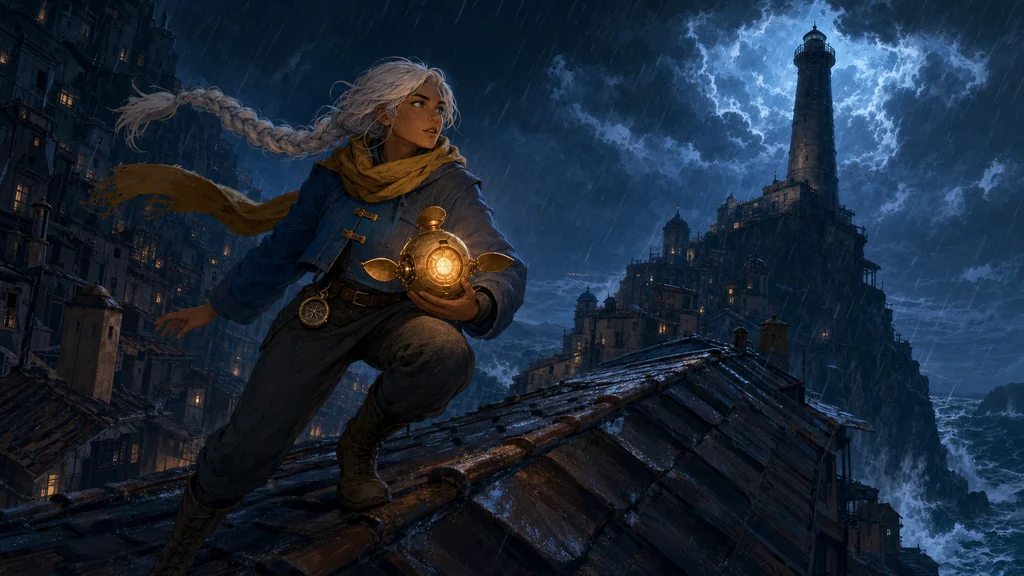
This guide follows an original short, The Last Light. Hana, a lighthouse engineer, carries the core of a damaged lantern drone through a storm to relight her city's dead beacon. The hero image is the final key art. The four illustrations below function as real production documents: beats, visual bible, animatic, and sound/edit board.
Sources were checked on July 29, 2026: OpenAI's image-generation guide, Runway's image-to-video guide, Google Cloud's Veo 3.1 prompting guide, Adobe Firefly keyframe documentation, and ElevenLabs sound-effects documentation. Features, pricing, and commercial terms can change; verify current policies before production.
1. Lock the story in six visual beats before generating shots
Change matters more than lore in a short. Write one sentence answering: who wants what, what blocks them, what choice do they make, and what is different at the end? Convert it into six pictures: setup, incident, decision, attempt, crisis, result. If a viewer cannot explain their order without captions, revise the story before spending on video.
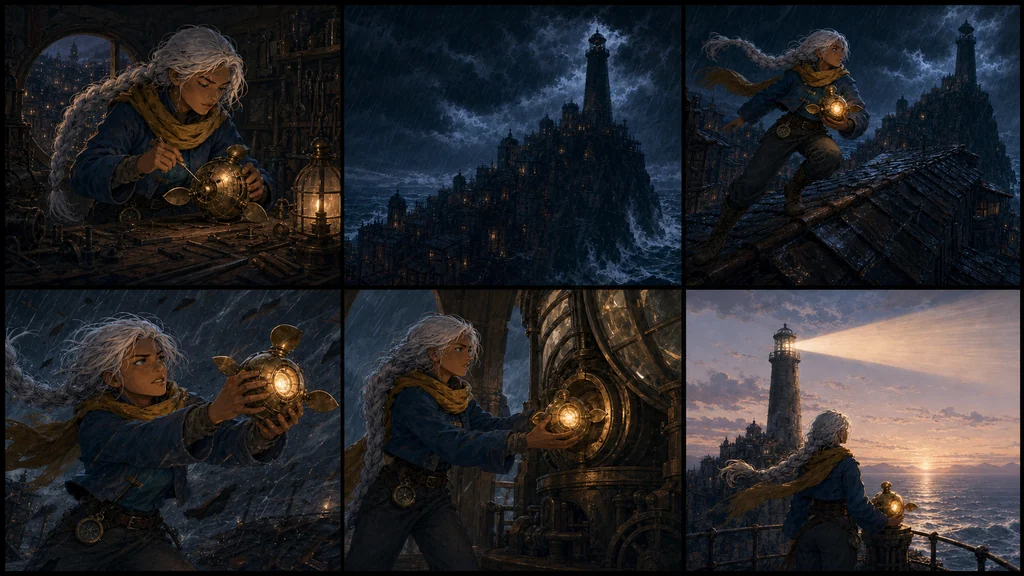
Image prompt — six-beat story board
Use case: identity-preserve
Asset type: landscape blog illustration for the story-design section of an AI short-animation guide
Input images: Image 1 is the approved key art and exact visual reference for Hana, the brass lantern drone, the storm city, lighthouse, palette, and hand-painted 2D animation style.
Primary request: Create a six-panel visual beat board for the same original short film, communicating a complete beginning-middle-end without written labels. Panel 1: Hana repairs the dim lantern drone in a small rooftop workshop. Panel 2: the city's lighthouse goes dark as a storm arrives. Panel 3: Hana runs across wet roofs carrying the drone. Panel 4: a violent gust nearly blows the drone away and Hana catches it. Panel 5: inside the beacon room she inserts the glowing drone core into the lighthouse mechanism. Panel 6: the beacon shines across calm water at dawn as Hana and the restored drone watch together.
Subject continuity: preserve Hana's warm brown skin, silver-white single braided ponytail, deep teal eyes, mustard scarf, cobalt cropped coat with two brass clasps, charcoal trousers, brown lace-up boots, round brass belt compass; preserve the spherical brass lantern drone with three petal fins and amber core.
Style/medium: same cinematic hand-painted 2D animation visual development as Image 1, clean cel shapes, restrained gouache texture, production storyboard color keys.
Composition/framing: 16:9 landscape, clean 3-by-2 grid of six equally sized cinematic panels with narrow dark gutters, readable thumbnail silhouettes, consistent left-to-right screen direction and geographic continuity.
Lighting/mood: progresses from warm workshop dusk to cold storm blue, then amber climax and pale sunrise; lighting continuity within each beat.
Constraints: exact same adult Hana and drone throughout; coherent story order; no redesign, no additional people; no text, letters, numbers, captions, arrows, logos, UI, watermark; all panels uncropped within outer canvas.
Avoid: photorealism, 3D render, childlike proportions, costume drift, mirrored compass or clasps, extra limbs, duplicated Hana inside a panel, random props, inconsistent lighthouse.| Beat | Event in The Last Light | Visible change |
|---|---|---|
| Setup | Hana repairs a fading lantern drone | One fragile warm light |
| Incident | The city lighthouse fails in the storm | The city falls into cold darkness |
| Decision | She leaves with the drone core | A clear crossing of the threshold |
| Attempt | She runs across wet roofs | Consistent direction toward the goal |
| Crisis | A gust almost tears the core away | A physical choice to protect it |
| Result | The core restores the beacon at dawn | The same city appears transformed |
Build a version that works silently before adding dialogue. Fewer essential lines mean less lip-sync and localization risk.
2. Combine character, prop, environment, and color in one visual bible
A front-facing portrait is not enough for a multi-shot film. Assemble front, side, and back views, expressions, asymmetric details, the hero prop, and an environment color key. Every shot should refer to this bible and preserve costume colors, prop geometry, geography, and time of day unless the story explicitly changes them.
OpenAI's image guide supports generation and editing with image inputs. The practical advantage comes from assigning each reference a role—identity, prop, environment, or style—and changing one variable at a time rather than flooding the model with undifferentiated images.
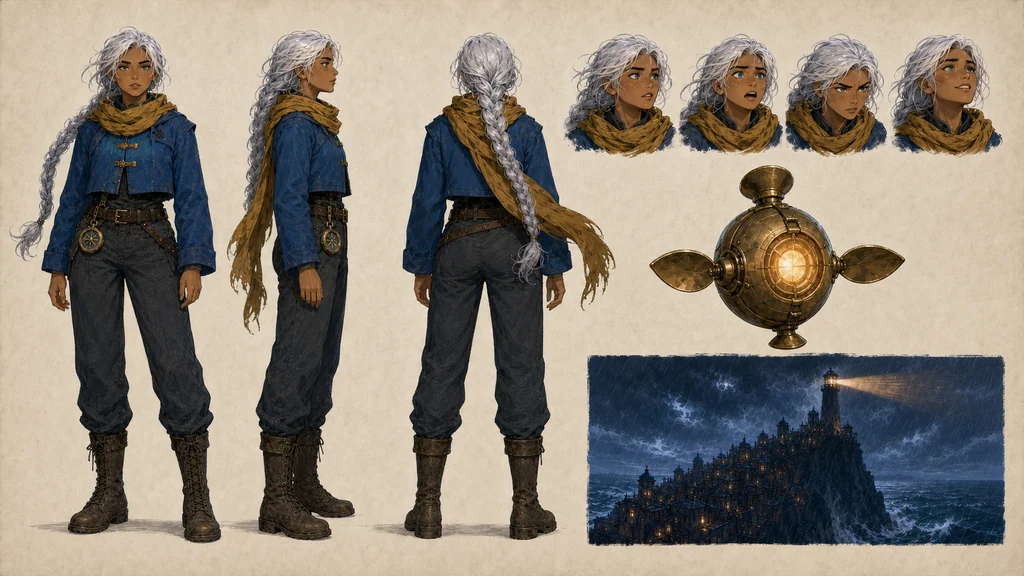
Image prompt — visual bible
Use case: identity-preserve
Asset type: landscape blog illustration for the visual-bible section of an AI short-animation production guide
Input images: Image 1 is the approved Hana key art; Image 2 is the approved six-beat board. Use both only as identity, prop, environment, palette, and style references.
Primary request: Create one polished production visual-bible board containing three equal-scale full-body views of the same adult Hana (front, strict side, back), four small consistent head-expression studies (calm, alarmed, determined, relieved), one clean enlarged view of the spherical brass lantern drone with its three petal fins, and one small environment color key of the cliff-city lighthouse in storm light. Do not add written labels.
Subject continuity: exact warm brown skin, silver-white single braided ponytail, deep teal eyes, mustard-yellow scarf, cobalt cropped weatherproof coat with two brass clasps, charcoal trousers, brown lace-up boots, round brass compass at belt; exact spherical brass drone with three symmetrical petal fins and warm amber core.
Style/medium: same cinematic hand-painted 2D animation visual-development style, clean cel shapes with restrained gouache texture, professional model sheet and prop sheet.
Composition/framing: 16:9 landscape, organized production-board layout on a warm neutral paper background, full uncropped turnaround figures aligned on one ground line, expression row clearly separated, drone and environment key balanced on the right; generous margins.
Lighting/mood: flat neutral lighting on character and drone; the environment key alone uses cold storm blue and amber beacon light.
Constraints: do not redesign; preserve adult proportions, facial geometry, braid, coat clasps, scarf, belt compass and boots; no text, letters, numbers, arrows, logos, UI, watermark; no additional people; no cropped feet.
Avoid: photorealism, 3D render, chibi or childlike proportions, mirrored details, costume drift, extra limbs, duplicated accessories, cluttered background.| Lock | How to document it | Review question |
|---|---|---|
| Face and adult age | Face close-up and four expressions | Does she become another person? |
| Costume | Front, side, back construction | Are clasps, scarf, and compass stable? |
| Prop | Shape, fin count, light color | Is the drone redesigned between shots? |
| Space | Relative lighthouse and roof positions | Do movement and destination connect? |
| Light | Storm blue → amber → dawn | Does color support the story change? |
3. Fail cheaply in the shot list and animatic
Do not begin with final images. For each shot record its purpose, shot size, camera, action, start/end state, and expected sound. Put rough frames into an editor. The goal is not beauty; it is readable information and rhythm.
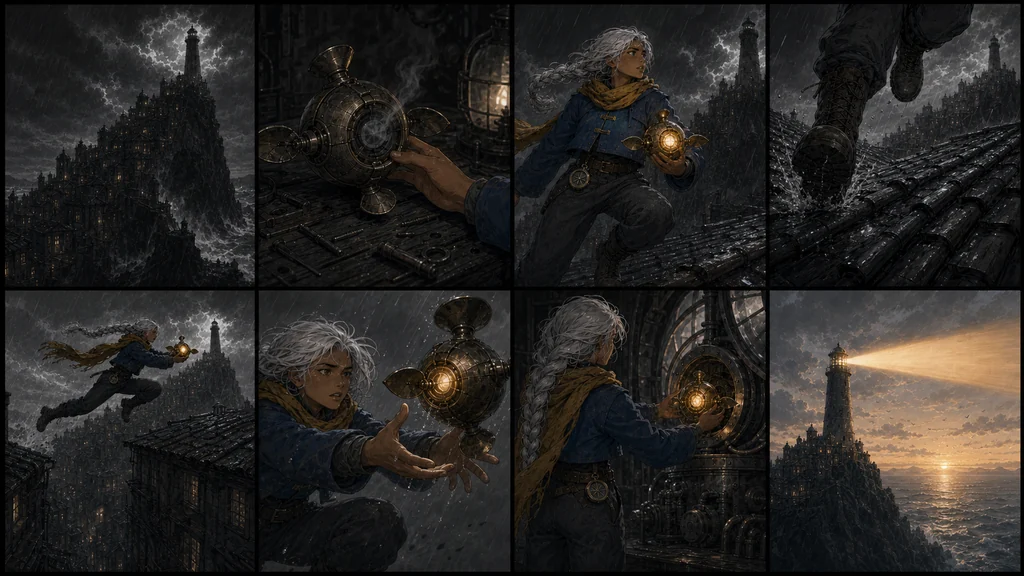
Image prompt — eight-shot animatic board
Use case: identity-preserve
Asset type: landscape blog illustration for the shot-design and animatic section of an AI short-animation production guide
Input images: Approved references define Hana, the lantern drone, lighthouse city, palette, and exact 2D animation style.
Primary request: Create a polished eight-panel grayscale-plus-color-accent animatic contact sheet for the same rooftop-to-lighthouse sequence. Show eight distinct film shots in story order: extreme wide storm city and dark lighthouse; workshop close-up of the drone core dimming; medium shot Hana deciding to go; low tracking shot of boots running across wet tiles; side wide shot of Hana jumping a roof gap with the drone; close-up of Hana catching the slipping drone; interior over-shoulder shot inserting the amber core into the beacon machine; final extreme wide dawn lighthouse beam over the sea. Use only restrained cobalt and amber accents over readable charcoal storyboard values.
Subject continuity: same adult Hana with warm brown skin, silver-white braid, mustard scarf, cobalt cropped coat, charcoal trousers, boots and belt compass; same spherical brass three-fin amber-core drone.
Style/medium: professional animation animatic frames, expressive cinematic storyboard drawing, clean values, selective hand-painted color accents, original production art.
Composition/framing: 16:9 landscape outer canvas, eight equal panels in a clean 4-by-2 grid with thin neutral gutters, each shot has a clearly different shot size but preserves screen direction, horizon logic and lighthouse geography; readable at thumbnail size.
Constraints: preserve character and prop identity; one coherent sequence; no written shot numbers, no text, letters, captions, arrows, logos, UI, watermark; no extra people.
Avoid: photorealism, 3D render, childlike proportions, costume drift, duplicate Hana within a panel, random camera-axis reversal, extra limbs, cluttered panel borders.| Test | Healthy state | Redesign signal |
|---|---|---|
| Purpose | One shot carries one idea or emotion | Three events compete in one shot |
| Direction | Movement, gaze, and wind connect | Left and right flip without motivation |
| Handoff | End pose supports the next opening | Every shot begins from a new pose |
| Camera | Motion serves a story purpose | Every shot spins or crash-zooms |
| Rhythm | Wide, medium, and close shots have reasons | Repeated framing flattens the scene |
Choose clip duration in the service settings after the shot structure is known. Keep one critical action per generation instead of forcing the finished runtime into the text prompt.
4. Let still images define appearance and video prompts define time
Runway's current guide says the input image already establishes composition, subject, lighting, and style. Image-to-video text should concentrate on subject action, environmental motion, camera motion, direction, and progression. Start with the essential motion, inspect the result, and add one element at a time. Motion blur or wind cues that contradict the requested action can be amplified in video.
Video prompt — quiet acting shot
Locked medium close-up inside the rooftop workshop. The engineer steadies the dim lantern drone with both hands, watches its amber core flicker, takes one controlled breath, then lifts her eyes toward the lighthouse outside the rain-streaked window. Her worried expression settles into determination. Loose silver hair strands and the end of her mustard scarf respond softly to the draft; tiny brass fins tremble and stop. The camera remains still, with only a gentle focus shift from the failing core to her eyes. Continuous seamless shot, restrained acting, natural hand contact, no cut.Video prompt — rooftop action shot
A side-tracking camera moves with the engineer as she runs across wet roof tiles while cradling the lantern drone. Her boots make firm contact and spray small arcs of rainwater; her braid, scarf, coat hem, compass, and the drone fins trail with delayed secondary motion in the same wind direction. She compresses into one decisive jump over a narrow gap, lands with visible weight, regains balance, and continues toward the lighthouse. Stable horizon, coherent left-to-right screen direction, physically plausible momentum, continuous seamless shot.Video prompt — first/last-frame beacon shot
Animate one continuous transition between the supplied first and last frames. The engineer seats the glowing brass core into the beacon mechanism and twists it until the gears engage. The drone fins fold inward; warm amber light travels through concentric glass rings, grows into a powerful beam, and sweeps across the rain-dark sea. The storm rain softens as the room changes from cold blue to warm gold. The camera performs a slow restrained arc around her shoulder and settles on the same final composition. SFX: close metal latch, rising mechanical hum, deep gear engagement, rain against glass, distant ocean. No dialogue, no cut, preserve identity, geometry, light direction, and screen space.Google's Veo guide separates cinematography, subject, action, context, and style/ambiance and documents reference-based and first/last-frame workflows. Adobe Firefly likewise lets still images anchor the beginning and end. Check that lens, camera height, lighting, and subject scale are compatible before asking a model to interpolate between two frames.
5. Design sound early and lock it with the final edit
Sound is an economical way to increase perceived scale. Separate dialogue, Foley, ambience, effects, and music, and add temporary sound in the animatic. ElevenLabs' documentation recommends generating individual effects and combining them in an editor rather than asking one prompt for an elaborate mixed sequence. Rain, boots, a metal latch, and a gear resonance can give generated motion weight.
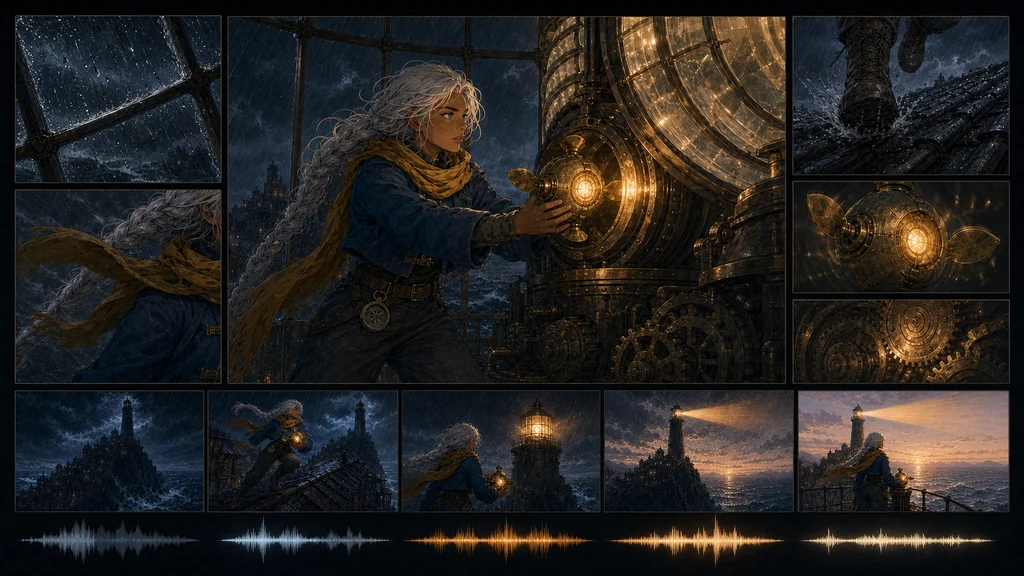
Image prompt — sound, edit, and final-QA board
Use case: identity-preserve
Asset type: landscape blog illustration for the sound-design, edit, and final-QA section of an AI short-animation production guide
Input images: Approved references define Hana, the lantern drone, beat order, visual bible, lighthouse geography, palette, and exact hand-painted 2D animation style.
Primary request: Create a cinematic sound-and-edit production board without written labels. A large central finished frame shows Hana inside the lighthouse beacon room inserting the glowing lantern drone core into the mechanism while the first golden beam ignites. Around it are four smaller inset detail frames that visually represent separate audio and edit layers: rain striking a metal window and wind-blown scarf; boots landing heavily on wet roof tiles; close-up of the brass drone fins vibrating with a warm mechanical hum; giant beacon gears engaging with a resonant pulse. Along the bottom, include a purely visual filmstrip of five tiny continuity thumbnails progressing from storm darkness to sunrise, accompanied by abstract clean waveform shapes in matching colors, but no UI text or numbers.
Subject continuity: exact same adult Hana, warm brown skin, silver-white single braid, teal eyes, mustard scarf, cobalt coat with two brass clasps, charcoal trousers, boots, belt compass; exact spherical brass three-fin amber-core drone.
Style/medium: premium original 2D animation production art, clean cel shapes, restrained gouache texture, cinematic color finish, sophisticated editorial contact-sheet design.
Composition/framing: 16:9 landscape, dominant central frame, four balanced detail insets, narrow gutters, bottom filmstrip and abstract waveform motifs; clean hierarchy and safe margins for 1024x576.
Constraints: preserve character, costume, prop and environment identity; no written text, letters, numbers, captions, logos, interface labels, brand marks, watermark; no extra people; no copyrighted elements.
Avoid: photorealism, 3D render, childlike proportions, costume drift, random electronics, illegible clutter, extra limbs, inconsistent light direction.
Do not use every generated clip. Pick the candidate that connects best, trim duplicated shared frames, and apply stabilization, retiming, or color correction only where needed. Finish a dialogue-free master first when possible; subtitles and localized voices become easier to manage.
Quality gates: regenerate only the failed shot
| Axis | Check | If it fails |
|---|---|---|
| Story | Cause and result remain readable | Revise beats or shot order |
| Identity | Face, costume, and prop match | Regenerate from the approved reference |
| Motion | Contact, weight, and hands are plausible | Simplify the start pose and action count |
| Continuity | Gaze, direction, light, and weather connect | Use an approved end frame as the next input |
| Audio | Effects land on visible events | Regenerate isolated effects and retime them |
| Rights and safety | Inputs, voices, and music are authorized | Replace unclear assets and obtain consent |
Conclusion: a short film is an approval chain
Quality comes from the order of small decisions, not the longest prompt. The logline and beats lock story direction; the visual bible locks identity; the animatic locks rhythm. After that, animate one shot at a time and join it through sound and editing so only the failed section must be replaced.
For a first film, limit the scope to one character, one or two locations, one central prop, and zero to two spoken lines. A completed film's production documents and approved frames become more valuable than a folder of unrelated generations.
Sources
- OpenAI — Image generation guide
- Runway — Image to Video Prompting Guide
- Google Cloud — The ultimate prompting guide for Veo 3.1
- Adobe Firefly — Create cinematic video from prompts and keyframes
- ElevenLabs — Sound effects guide
Generated frames can contain errors. Confirm consent and usage rights for real faces and voices, copyrighted characters, music, and reference images, then have a person review the complete film before publication.