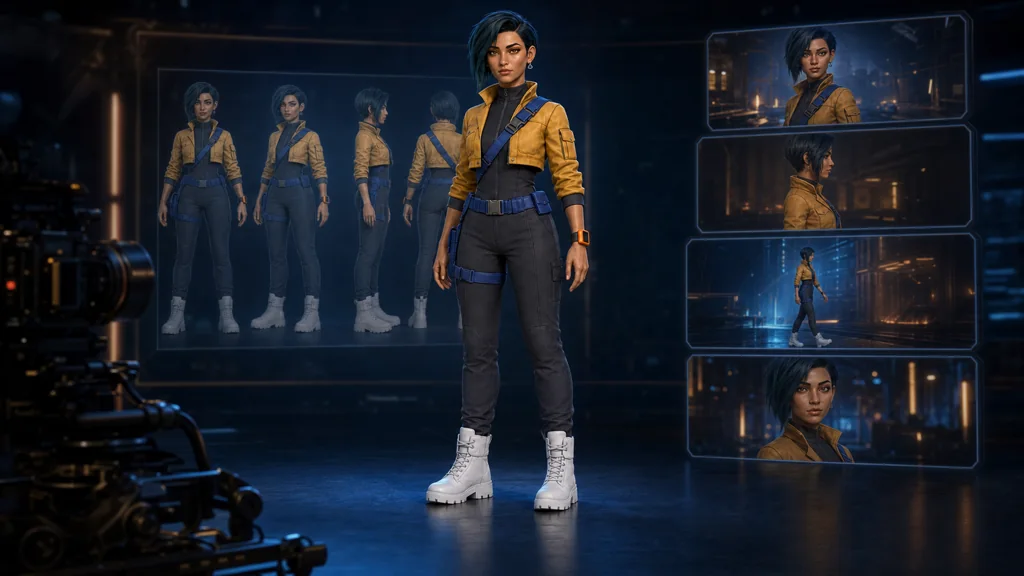
One of the most visible failures in AI video is character drift. Hair grows between shots, a jacket loses pockets, an accessory changes sides, or a close-up looks like a different person. Repeating a long text description for every generation rarely fixes this reliably.
The better solution is to build a character reference system, not merely a beautiful character drawing. Add expressions, motion, materials, accessory placement, and test shots to the traditional front-side-back turnaround so the model can see what must remain stable.
Runway recommends a high-quality reference with a neutral expression and even, natural light as a flexible starting point. Veo 3.1 supports character, scene, and object “ingredients” for consistent elements across shots. Adobe Firefly can use first and last frames as visual anchors. The shared principle is simple: stabilize the still reference first, then prompt the motion.
What belongs in a video character sheet
| Component | Lock in the sheet | Check in video |
|---|---|---|
| Face | Adult age, shape, feature proportions | Is it the same person in close-up? |
| Hair | Length, part, silhouette, color | Does motion preserve length and direction? |
| Costume | Construction, color placement, closures | Do parts disappear between shots? |
| Accessories | Side, size, and attachment | Are asymmetric items still on the correct side? |
| Proportions | Height, shoulders, limb length | Does the body match from wide to medium? |
| Motion | Rest pose, walk, hand gestures | Does movement retain weight and personality? |
| Lighting | Skin and costume under neutral light | Do signature colors survive scene lighting? |
Our example is an original adult character, Mina Vale. Her anchors are warm olive skin, amber eyes, a deep-teal asymmetrical bob with a long lock on her right, a silver triangle earring on the left, mustard jacket, cobalt harness, white boots, and an orange device on her right wrist. Choose six to eight features that remain recognizable at small frame sizes.
Hero image production prompt
Use case: identity-preserve
Asset type: wide cinematic blog hero for a guide about making character sheets for AI video production
Input images: Image 1 is the exact identity, costume, proportions, and visual-style reference for Mina Vale.
Primary request: Create a premium cinematic production-studio scene that communicates one character remaining consistent from a design sheet into multiple video shots.
Scene/backdrop: elegant dark virtual-production studio with a large softly glowing storyboard wall, subtle film-frame shapes, a camera rig silhouette, and translucent turnaround views of Mina behind the main subject; no readable interface or labels.
Subject: the exact same clearly adult 27-year-old Mina Vale from Image 1 stands confidently in the foreground in a neutral three-quarter hero pose. Preserve her exact warm olive adult face, amber eyes, asymmetrical deep-teal bob with the long lock on her right, left silver triangular earring, mustard cropped utility jacket, charcoal high-neck jumpsuit, cobalt harness and belt, white boots, and orange right-wrist device.
Style/medium: same polished stylized 3D animated-feature rendering as Image 1, premium cinematic editorial art, original character.
Composition/framing: wide 16:9 landscape blog hero, Mina framed head to boots near center, translucent character views and four abstract cinematic frames arranged behind her, clean silhouette, readable at thumbnail size.
Lighting/mood: deep navy studio, cobalt-blue rim light, warm amber key light, restrained orange accents, confident professional mood.
Constraints: preserve exact identity and costume; one physical main character only; ghosted reference views must depict the same identity; no text, letters, numbers, logos, watermarks, copyrighted characters, or real-person resemblance.
Avoid: redesign, different hairstyle, missing accessories, sexualized pose or clothing, excessive hologram clutter, malformed hands, cropped boots.
1. Lock the coordinates with a master turnaround
Show front, three-quarter, strict side, and back views at the same scale. Avoid dramatic light and perspective. A neutral expression, relaxed A-pose, and even background help the model read the back of the hair, jacket length, and equipment placement—not only the face.
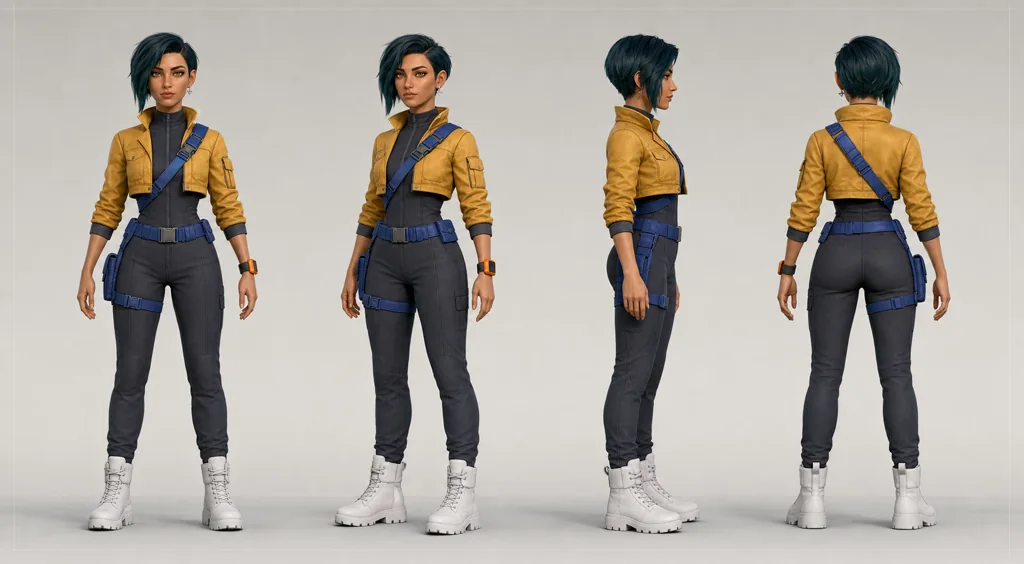
Image production prompt — master turnaround
Use case: stylized-concept
Asset type: landscape blog illustration and master character anchor sheet for AI video production
Primary request: Create a clean professional master turnaround sheet for one original adult animated-film heroine named Mina Vale, designed to be reused as an identity reference across AI-generated video shots.
Scene/backdrop: seamless warm light-gray studio background with a faint floor line and very subtle neutral framing guides, but absolutely no written labels.
Subject: Mina Vale, a clearly adult 27-year-old woman with warm olive skin, amber eyes, a short asymmetrical deep-teal bob haircut with one longer face-framing lock on her right side, a small silver triangular earring in her left ear, and a calm focused expression. Practical non-revealing costume: mustard-yellow cropped utility jacket over a charcoal high-neck fitted jumpsuit, cobalt-blue cross-body utility harness and belt, matte white high-top field boots, compact orange wrist device on her right wrist. Distinct identity anchors must remain exact: adult facial structure, amber eyes, asymmetrical teal bob, left silver triangle earring, mustard jacket, cobalt harness, white boots, orange wrist device.
Style/medium: polished stylized 3D animated-feature character design, refined believable anatomy, premium production concept art, soft realistic materials, original design with no resemblance to any existing character or real person.
Composition/framing: wide landscape character turnaround sheet. Show four evenly spaced full-body views of the exact same character: front, three-quarter, strict side profile, and back. Neutral relaxed A-pose, head-to-boots fully visible in every view, matching height and scale, generous margins, clean silhouettes.
Lighting/mood: even soft studio lighting, neutral white balance, minimal shadows, colors easy to sample.
Constraints: exactly one character identity repeated in four views; preserve identical adult face, proportions, hairstyle, costume construction, accessories, and color placement across every view; practical tasteful clothing; natural hands; no text, no letters, no numbers, no logos, no watermark.
Avoid: childlike proportions, sexualized clothing or pose, inconsistent faces, changing hair length, changing jacket design, missing accessories, extra limbs, cropped boots, dramatic perspective, action background, copyrighted character resemblance.
Inspect the sheet closely:
- Does the adult facial structure and age remain stable?
- Does hair length connect logically around the head?
- Are the earring and wrist device on the correct sides?
- Do the jacket hem, harness, and belt connect front to back?
- Do all views share height and body proportions?
Fix the master before expanding it. More references built from a contradictory anchor only create more contradictory evidence.
2. Define the allowed range with expressions and motion
A neutral portrait alone may not survive a smile or startled reaction. An expression sheet shows that brows, eyelids, and the mouth can change without changing the facial structure or age.
A motion sheet defines the character's center of gravity and gesture language. Three to five useful actions—standing, walking, reaching, turning—are enough. Avoid extreme foreshortening in the first pass because it hides hands and costume construction.
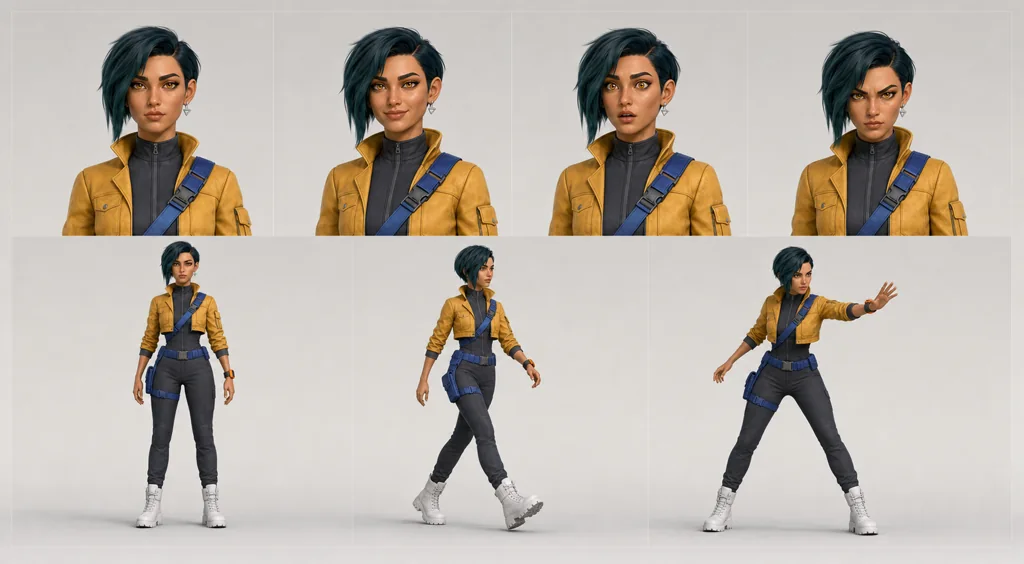
Image production prompt — expressions and motion
Use case: identity-preserve
Asset type: landscape blog illustration showing an expression and motion reference sheet for AI video
Input images: Image 1 is the exact master character reference. Preserve Mina Vale's identity, age, costume, and stylized 3D rendering.
Primary request: Create a clean production-ready expression and motion sheet for the exact same adult character. Show four head-and-shoulder expression studies across the top—neutral focused, warm smile, startled alert, determined—and three clear full-body action silhouettes across the bottom—relaxed standing, brisk walk mid-stride, reaching forward with her right hand.
Scene/backdrop: simple cool light-gray studio with very faint panel divisions and no written labels.
Subject: exact same adult face, amber eyes, asymmetrical deep-teal bob and right-side long lock, left silver triangle earring, mustard utility jacket, charcoal jumpsuit, cobalt harness, white boots, orange right-wrist device. Expressions should alter only facial muscles, never age or facial structure.
Style/medium: same polished stylized 3D animated-feature concept art as Image 1, consistent production sheet quality.
Composition/framing: wide landscape grid, four portrait crops above and three full-body actions below, all fully contained and evenly spaced, hands visible.
Lighting/mood: flat soft neutral reference lighting, color-accurate and easy to compare.
Constraints: preserve exact identity, adult proportions, hair, costume construction, accessories, and colors in every study; no text, letters, numbers, logos, watermark.
Avoid: childlike face, facial drift, costume changes, exaggerated cartoon expressions, sexualized poses, extra fingers, duplicated limbs, cropped feet.
Describe observable changes rather than emotion labels alone. Instead of “surprised,” specify that the eyes open slightly and the mouth parts while facial structure and adult age remain unchanged.
3. Build a separate close-up sheet for materials and props
Small buckles and pockets disappear in a wide shot. Give the model close references for the face, hair, jacket construction, belt, signature prop, and footwear so it does not invent those details in close-up.
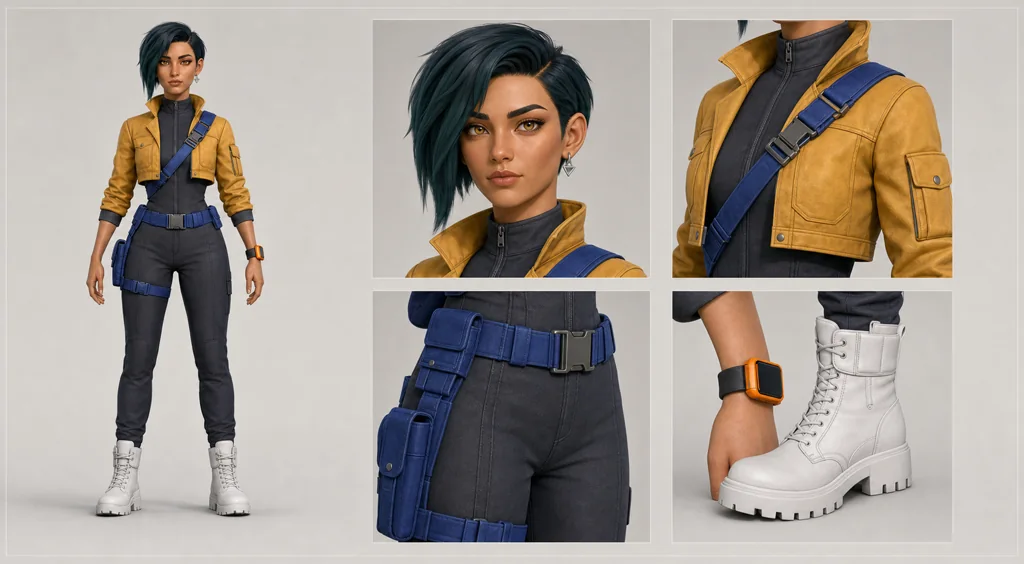
Image production prompt — costume, material, and prop continuity
Use case: identity-preserve
Asset type: landscape blog illustration showing a costume, material, and prop continuity sheet for AI video
Input images: Image 1 is the exact master character reference. Preserve Mina Vale without redesign.
Primary request: Create a production-ready continuity sheet that makes costume colors, construction, materials, and signature props easy to reproduce across shots.
Scene/backdrop: clean warm-gray studio presentation board with restrained geometric spacing, no written labels.
Subject: on the left, one exact full-body three-quarter view of Mina Vale. On the right, four large isolated close-up studies: her asymmetrical deep-teal bob and left silver triangle earring; mustard utility-jacket collar, seam and pocket construction over the charcoal high-neck jumpsuit; cobalt harness buckle and belt pouch; orange right-wrist device beside the matte white boot material. Every detail must match Image 1.
Style/medium: same polished stylized 3D animated-feature production concept art, realistic fabric, brushed metal, matte polymer and leather texture studies.
Composition/framing: wide landscape, full-body figure on left and four clean detail windows on right, generous margins, no cropped detail objects.
Lighting/mood: even soft studio light with subtle material highlights, neutral color calibration.
Constraints: exact adult identity and exact costume; keep color placement and accessory side consistent; no alternate outfit; no text, labels, letters, numbers, logos, or watermark.
Avoid: character redesign, changed colors, extra jewelry, high-fashion styling, sexualization, clutter, hands with anatomy errors.
Define materials, not color names alone: mustard leather, matte charcoal fabric, cobalt nylon webbing, brushed-metal buckle. Scene light can change brightness while the reflectance and color relationships remain identifiable.
4. Test continuity in actual shot designs
A clean design sheet does not guarantee usable video. Create a board that tests the same character in wide, medium, close-up, and hand-action shots before spending credits on motion.
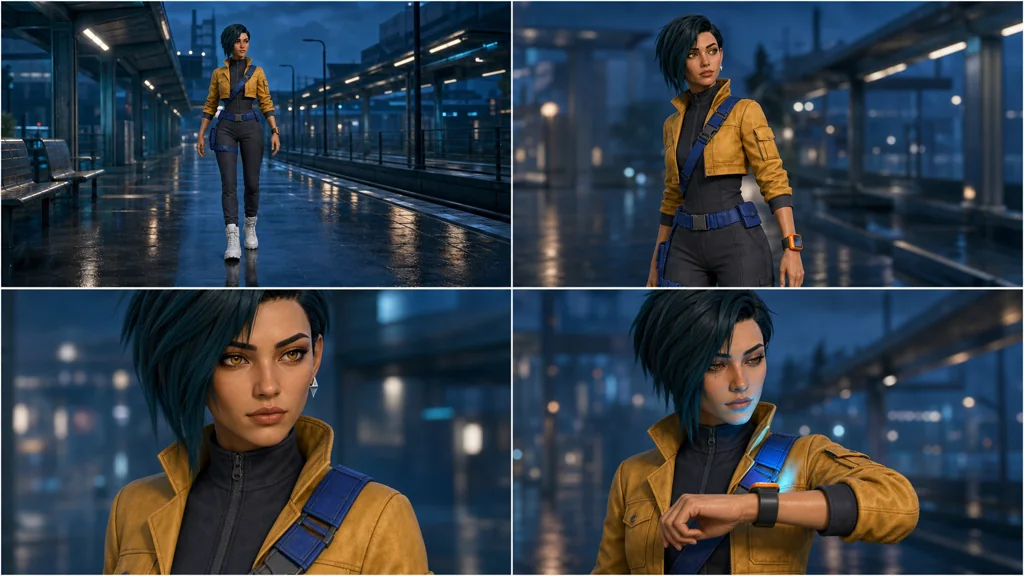
Image production prompt — shot continuity board
Use case: identity-preserve
Asset type: landscape blog illustration demonstrating shot-to-shot character continuity for AI video
Input images: Image 1 is the exact master character and style anchor. Preserve Mina Vale exactly.
Primary request: Create a four-panel cinematic continuity board showing the exact same adult character in one short scene: panel 1 wide shot entering a rain-wet futuristic transit platform; panel 2 medium shot turning toward a soft sound; panel 3 close-up of her focused amber eyes and expression; panel 4 three-quarter shot raising the orange right-wrist device while blue light reflects on her face. The action should progress naturally while identity and costume stay unchanged.
Scene/backdrop: the same elegant transit platform at blue hour across all four panels, wet floor reflections, restrained distant lights, no readable signage.
Subject: exact same Mina Vale from Image 1 in every panel—same adult facial structure, amber eyes, asymmetrical teal bob with long right lock, left silver triangle earring, mustard cropped jacket, charcoal high-neck jumpsuit, cobalt harness, white boots, orange device on right wrist.
Style/medium: same polished stylized 3D animated-feature look, cinematic production keyframes, original design.
Composition/framing: wide 16:9 board divided into four equal clean frames with narrow gutters; deliberate progression from wide to medium to close-up to three-quarter; consistent screen direction and eyeline.
Lighting/mood: coherent cool blue-hour lighting with warm amber face accents, same color grade in all panels.
Constraints: preserve exact identity, adult age, hairstyle, outfit, accessory side, proportions, environment geography, and color grade across panels; no text, letters, numbers, logos, subtitles, watermark.
Avoid: identity drift, wardrobe changes, hair-length changes, reverse screen direction, sexualized framing, duplicate characters, malformed hands, unrelated props.
Check five things:
- The same face and adult age in every shot.
- Hair and asymmetric accessories stay on the correct side.
- Costume construction matches between wide and close-up.
- Eyeline and screen direction do not reverse accidentally.
- Mustard, cobalt, and orange remain related under scene light.
5. Separate the character anchor from the shot prompt
When every requirement is mixed into one paragraph, drift becomes difficult to diagnose.
| Prompt block | What it controls | Change policy |
|---|---|---|
| Character anchor | Face, hair, costume, accessories, proportions | Keep fixed |
| Shot direction | Framing, angle, camera motion | Change per shot |
| Action direction | Subject, environment, speed | One key action at a time |
| Scene direction | Location, time, lighting, mood | Preserve signature colors |
| Invariants | Elements that must not change | Repeat when iterating |
In image-to-video, the input already defines composition, subject, lighting, and style. Runway's official guide recommends focusing the text on subject action, environmental motion, camera movement, and temporal progression rather than redescribing the still image.
The adult character walks forward at a measured pace. Her jacket hem and short asymmetrical hair react subtly to the cool platform breeze. The camera tracks backward smoothly at waist height, maintaining her centered screen position. Wet floor reflections move naturally with her steps. Preserve her face, costume, accessory sides, body proportions, and the blue-hour color grade from the reference image. No new characters, no wardrobe changes, no transformation.Do not ask for walking, turning, dialogue, a crash zoom, and an explosion in one clip. Validate walking and tracking first, then add a head turn or wrist-device action in the next shot.
6. Applying the sheet in popular workflows
Runway References and Image to Video
Save the evenly lit master as a character reference and create an approved scene still first. Use that high-quality frame for video and prompt mostly for motion. Blurry hands or facial artifacts in the first frame can become more pronounced in motion.
Veo Ingredients to Video
Prepare character, location, and important props as separate references. Google's guide frames direction as cinematography + subject + action + context + style and ambiance. Give each input a clear role instead of submitting one overloaded collage.
Adobe Firefly first and last frames
Use approved frames from the shot board to anchor the beginning and end. Verify identity and costume at both ends before generation, then describe the action and camera transition between them.
Feature names and supported models can change. Check each service's current documentation before production.
7. Manage the folder like a character bible
character/mina-vale/
  01-master-turnaround.webp
  02-expression-motion.webp
  03-costume-materials.webp
  04-shot-continuity.webp
  character-anchor.txt
  shot-prompts/
  approved-frames/
  rejected-drift-examples/
Use only approved images as future references. A nearly correct image with a different face will compound drift. Keep rejected examples as a visual record of prohibited changes.
Final checklist
- The character is clearly an adult and does not imitate a real person or existing IP.
- Face, hair, and proportions connect across front, side, and back.
- Costume construction and color placement match in every sheet.
- Asymmetric accessories remain on the correct side.
- A neutral expression and baseline light are available.
- Expression and motion ranges have their own sheet.
- Close-up materials and props are documented.
- Continuity has been tested in wide, medium, and close-up shots.
- Video prompts focus on motion rather than restating appearance.
- Only approved frames become new references.
Conclusion
The purpose of a video character sheet is not to display attractive concept art. It is to reduce the information the model must guess again in every shot. Lock form with a turnaround, define the allowed range with expressions and motion, document close-up materials, and test real shot continuity.
No generative model guarantees perfect identity. For important work, inspect face, hands, accessory sides, costume boundaries, and environment geometry shot by shot. Regenerating only the failed shot from an approved keyframe is usually more stable than restarting the whole sequence.
Sources
- Runway — Creating with Gen-4 Image References
- Runway — Image to Video Prompting Guide
- Google Cloud — Ultimate prompting guide for Veo 3.1
- Adobe Firefly — Generate videos using images
- OpenAI — Creating with Sora safely
Obtain explicit consent and the necessary rights before using a real person's image or voice. Generated output can contain unintended likenesses and continuity errors, so review it before public or commercial use.