If the results of GPT Image 2 are more subtle than expected, or if the design continues to change, you should first check the order and fixed conditions of the information over the length of the prompt. OpenAI’s official guide explains that a good image prompt does not necessarily need to be long, and it is important to clearly communicate purpose and scene, subject, visual style, orality and limitations.
This article outlines how to take advantage of ChatGPT right away and how to improve the quality of the API’s `gpt-image-2`.
First know the name.
Published by OpenAI in April 2026, the product name is ChatGPT Images 2.0, and the model ID designated by the developer in the Image API is `gpt-image-2` . The official model page introduces GPT Image 2 as the latest image generator model that supports fast high-quality creation and editing, flexible image sizes, and high-performance image input.
- When to use in ChatGPT: Create images in natural language and continue to edit in conversation
- When used in the API: `model="gpt-image-2"` and specification of size and quality.
The best working prompt formulas.
Complex frames are easy to modify if divided into the following order.
Use → background and scene → core topics → actions and details → verb → lighting and colour → medium and texture → conditions to keep
The official GPT Image Prompting Guide also recommends consistent ordering like `Topic Topic Topic Topic Topic Topic Topic Topic Topic Topic Topic Topic Topic`. First write the end-use, such as ads, UI backups, and infographics, makes it easier for the model to judge the completion and visual grammatics it needs.
Copy the template below to replace only the necessary parts.
Create them for use.

Scenes: [place, time, background, atmosphere]
Subject: [Characteristics of a person or thing, costume, material, appearance]
Action: What you are doing, the position of your eyes and hands
Oral: [proportion, shot size, camera height, subject location, range]
Light and color: [Direction and nature of the light, color palette, contrast]
Style: [photo, watercolour, 3D, editing design, etc. and surface details]
Necessary Conditions: [Things You Must Have]
Exceptional conditions: [Text, logo, watermark, unnecessary things, etc.]
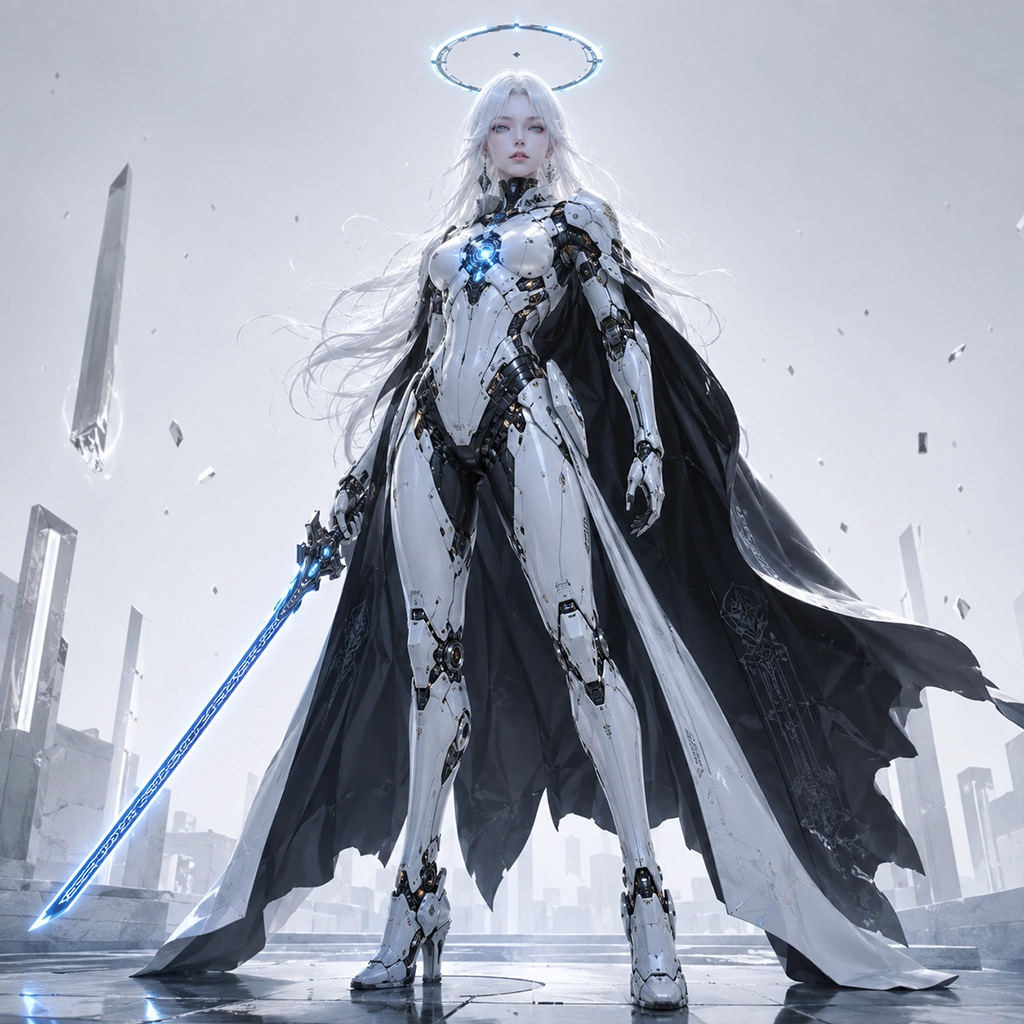
Image 1 — Halo Cybernetic Swordswoman

Prompt used
A full-body cinematic portrait of a beautiful adult cybernetic woman with long flowing white hair, pale skin, icy blue eyes, and a serene emotionless expression. She wears sleek black-and-white biomechanical armor with polished white plating, exposed mechanical joints, a long black cape, and a glowing circular blue chest core. A luminous futuristic halo floats above her head as she holds a glowing blue energy katana lowered at her side. Slightly low-angle vertical composition, entire body and sword visible, composed and godlike dominant pose. Minimal pale grey-white futuristic environment with subtle floating debris. Ultra-detailed sci-fi concept art, elegant hard-surface mech design, premium futuristic fashion, beautiful facial detail, glossy textures, soft high-key lighting, cool blue emissive glow, subtle rim light, crisp armor reflections.Bad and improved yes.
A very strange prompt.
Make a good and delicious coffee advertisement.`Excellent is` can’t tell the word, material, customer class, or medium by expression alone. Take a look at the actual shooting instructions as follows.
Create a serotype social advertising image of premium ColdBrown new products.
Place a dark garlic glass bottle slightly to the right of the center of the black stone table.
On the surface of the bottle there are cold drops of water, and on the left there is a wide, dark blanket for placing advertising sentences.
Medium closure of low camera height, soft limelight coming in from the right back,
Reduced color of chocolate brown amber center, glass reflections and stone texture like real product photos.
The shape of the bottle is displayed only one, and no person, extra cup, logo, word, watermark is placed.
The key is to change an evaluator like `beautifully` into an indicator that can be verified, such as location, light, material, and resin.
Image 2 — Industrial Heavy-Armored Mecha Boss
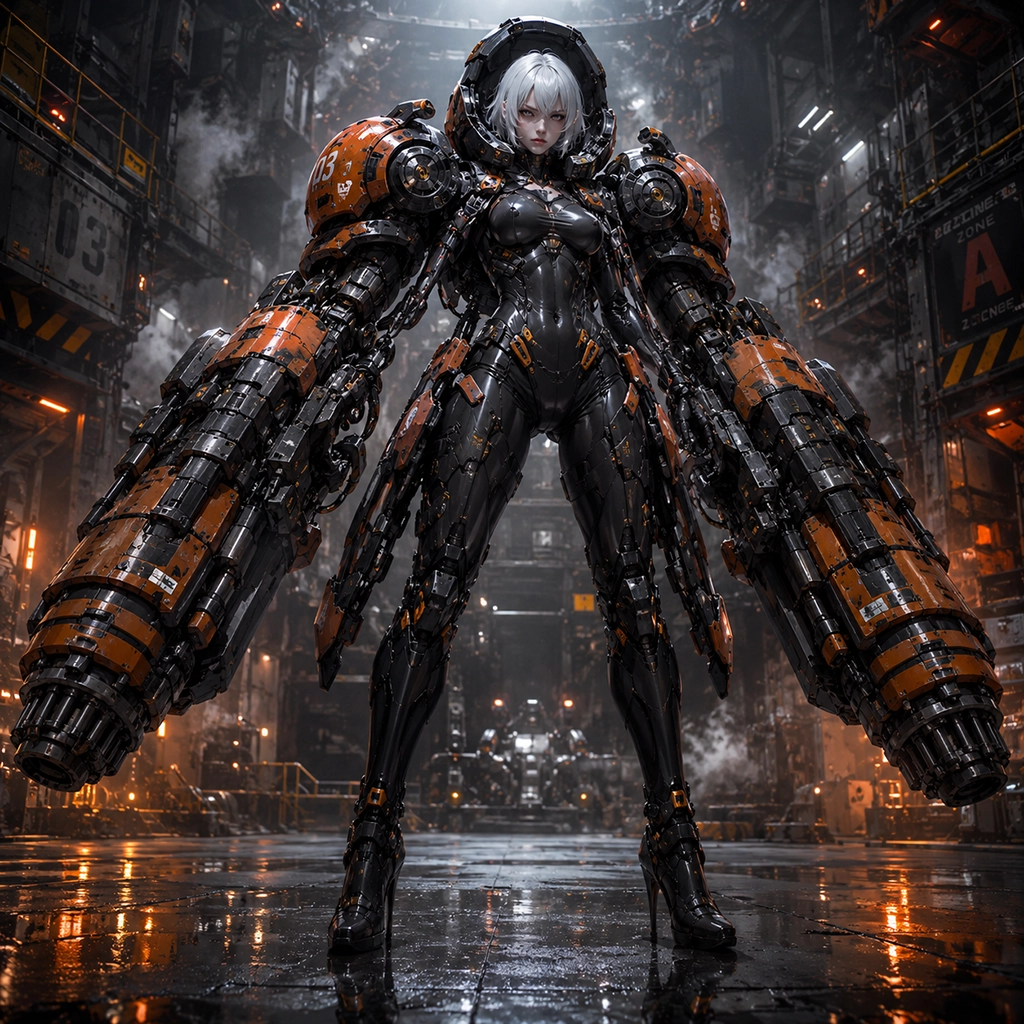
Prompt used
A full-body low-angle cinematic portrait of an adult armored mecha woman with short white hair, pale skin, intense eyes, and a stern battle-ready expression. She faces forward in a powerful boss pose, wearing a glossy black cybernetic bodysuit and dark industrial armor with orange plating. Massive cylindrical shoulder modules and oversized orange-and-black forearm cannons hang at both sides, filled with cables, pistons, bolts, hydraulics, and segmented mechanical details. Tall slim silhouette contrasted with enormous weapon arms, armored legs, and high-heeled combat boots. Dark industrial hangar, wet reflective floor, smoke haze, metal catwalks, heavy machinery, orange warning lights. Ultra-detailed heavy mecha concept art, cinematic sci-fi realism, polished dark metal, cool overhead lighting, warm orange glow, strong rim light, dramatic reflections.How to Make Photos Naturally.
In the real case, it is better to describe it as taking a real moment than simply putting `photorealistic` in it. The official guide recommends that you reduce the imperfections of reality, such as scratches and wrinkles on the skin, old clothes, fine scratches, and avoid excessive studio corrections or scratches.
Natural documentary of a 30-year-old worker picking books at a small bookstore in Seoul on a rainy evening.
Without looking at the camera, he looks at the bottom of the bookboard and touches the booklight with one hand.
A level medium shot visible above the back, 50mm lens feel, but not excessive depth.
The dim natural light coming in from the left of the window and the warm light of the room are mixed.
Realistically represents the fiber of a wet coat, natural skin ligaments, and a slightly dull book arrangement.
It should look like an honest and observational real picture, avoiding beauty retouching, excessive HDR and artificial poses.
It is better to use the camera numbers as a hint that conveys the smell and atmosphere than as a guarantee value that is physically accurately reproduced.
How to accurately insert the letters in the image
GPT Image 2 is strong on posters and infographics that contain text, but unambiguous requests for sentences can add unnecessary letters.
- linked to the indicator.
- Keep the letters short.
- Specify the font feel, thickness, color, size, location.
- `Exactly once.` is defined as `No other letters.`.
- If necessary, write a single letter.
In the upper center, the title "AI WORKFLOW" is marked exactly once with a thick white Sancery letter.
Under the title, just put “Plan. Create. Improve.” in small gray letters.
In addition to the two sentences, no letters are added, including numbers, logos, or watermarks.
The text should be clear and the spaces between the letters should be uniform.
Small letters, multiple fonts, and data-rich infographics are recommended to compare `quality="medium"` or `quality="high"` in an API.
Image 3 — Dragon Heavy-Artillery Mecha
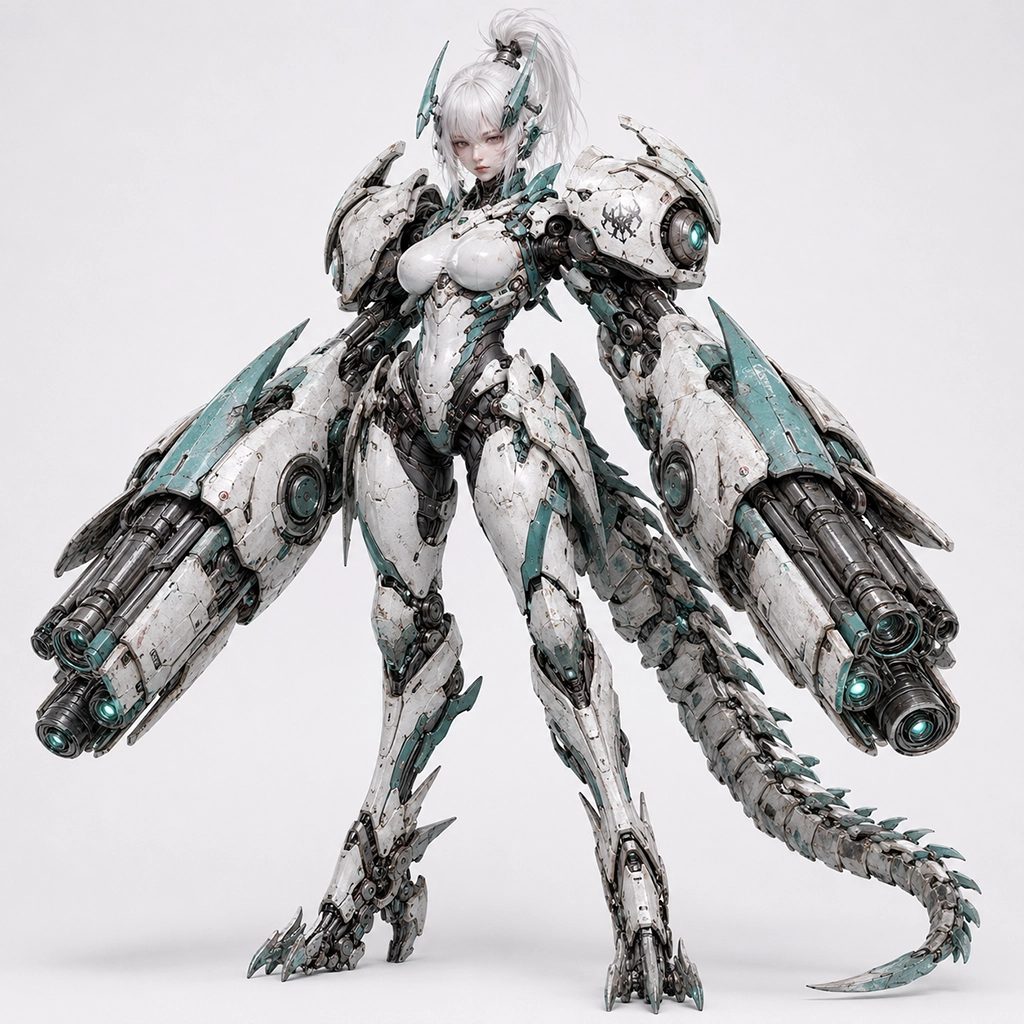
Prompt used
A full-body vertical studio portrait of an adult cybernetic woman with short white hair in a high ponytail, pale skin, soft red eyes, and a calm serious expression. She has teal horn-like mechanical head fins and a tall feminine biomechanical body covered in weathered white-and-teal armor. Massive twin cannon arms, large shoulder weapon units, exposed black mechanical joints, clawed feet, glossy white chest armor, battle scuffs, worn paint, and a long segmented mechanical dragon tail curving fully within the frame. Centered pose, facing slightly toward the viewer, entire figure and tail visible. Clean white futuristic studio background with a premium product-shot aesthetic. Ultra-detailed hard-surface mecha design, dragon-inspired military construction, realistic machinery and wear, soft studio lighting, crisp white armor reflections, subtle teal highlights, gentle sculpting shadows.When editing an existing image, separate change and preservation.
The most important phrases in the editing prompt are `Anything to change.` and `What to leave.`.
Change the colour of the jacket to dark.
The person’s face, skin color, body shape, posture, appearance, hairstyle and position of hands should be kept accurate.
It does not change the background, camera angle, framing, lighting, shadow, and contrast.
Do not add new accessories, letters, logos, or watermarks.
When using multiple images together, `Figure 1: Product photo` and `Figure 2: Stylish image.` specify numbers and roles, and explain which images to apply to the other images.
Image 4 — Pink Rabbit Mecha Beauty Portrait
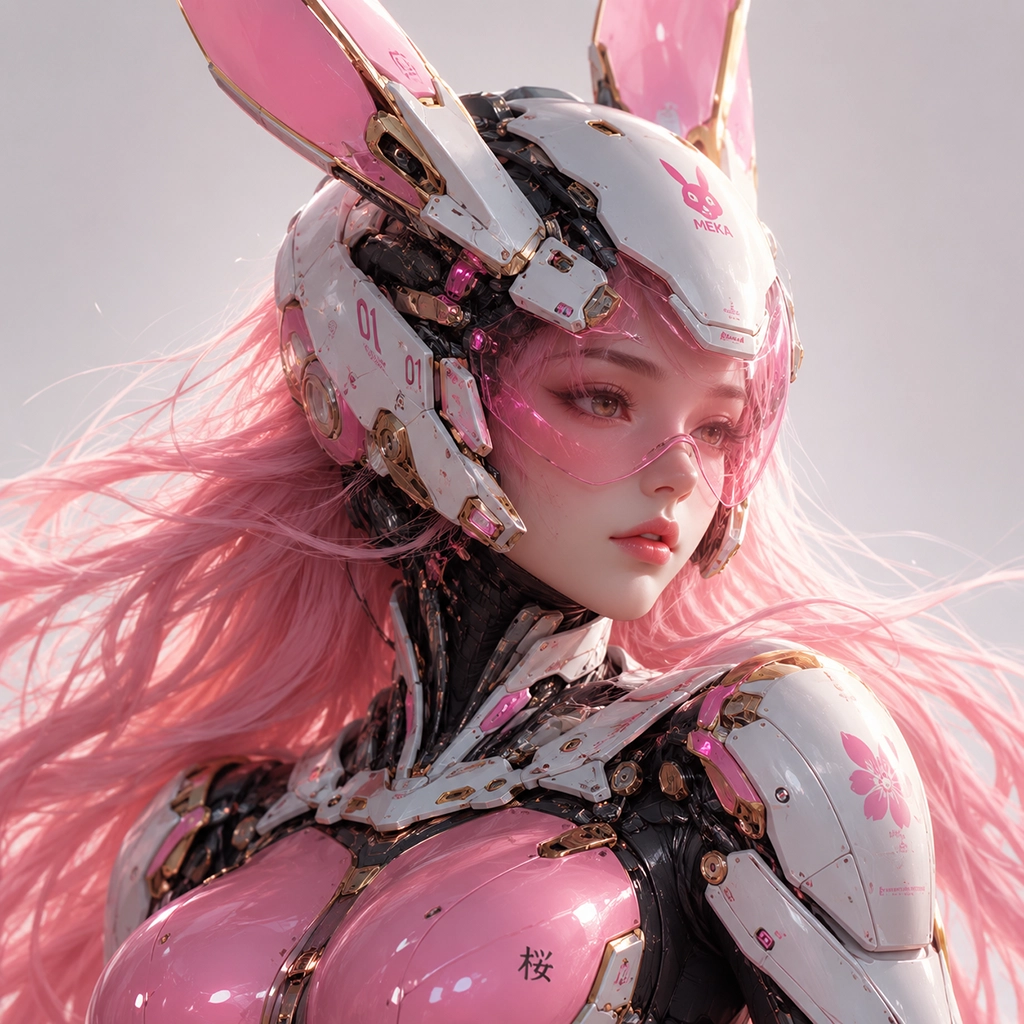
Prompt used
A tight cinematic close-up of a beautiful adult cybernetic woman with long flowing pink hair, pink eyes, fair skin, and a quiet melancholic expression. She is slightly turned to the side, looking off-camera with a calm serious gaze. She wears a futuristic rabbit-themed combat helmet with long mechanical ears and a transparent pink visor, combined with glossy white, pink, and gold biomechanical armor. Detailed pink chest plating, black internal cybernetic framework, layered shoulder and neck mechanics, fine decals, symbols, and premium mechanical details. Head, upper torso, chest armor, and helmet fully visible. Clean bright studio background with a luxury sci-fi editorial aesthetic. Ultra-detailed beauty portrait, high-end mecha fashion, refined facial detail, glossy concept render, soft beauty lighting, luminous visor reflections, subtle backlight through pink hair, delicate facial highlights.Do not try to be perfect at once.
High-quality results are easier to get through a short correction conversation than a huge prompt.
- Confirm the theme and the entire verb in the first prompt.
- In the second request, modify only one light or color.
- Remove unnecessary elements from the third request.
- Important fixed conditions are repeated every time.
For example, if the model starts to change the results, re-determine the preservation list like `Keep the camera lighting.`.
directed prompt.
Tagged youtuber.
16:9 YouTube wallpaper for AI productive video.
A dark Navi workshop, a half-transparent AI cube shining in the middle right, and a limited blue data line around it.
The left 40% is empty simple and dark so you can put a big title.
Strong clarity and clear center objects, easy to recognize even on a small screen.
Do not put people, letters, logos, watermarks, and complex UI.
Photographs of shop.
Advanced e-commerce product photo of the lightless white wireless headset case.
Place the product at a 3/4 angle in the middle of a bright gray background, and the cap is slightly open.
Large softbox lights on the top left, soft and short touch shadows on the bottom.
Represents fine lightless texture of plastic and precise corners, clean color balance.
Showing only a single product, without hands, decorations, letters, logos, or watermarks.
infographics
“5 Steps of a Good AI Prompt” serotype infographic for beginners.
Place the five stages of the goal, context, input, limitation, and output type from top to bottom and connect with the arrow.
Each step includes only one short title and one line of explanation.
White background, native and blue points, clear sunshine, wide spaces, simple linear icons.
Render texts accurately and do not put any additional steps, decorative sentences, logos, or watermarks.
API coordinates prompt and output settings together.
`gpt-image-2` is `low`, `medium`, `high` Supports quality.Fast idea navigation `low` From testing, person closing up; small letters; complicated charts; high resolution results `medium` and `high`
const result = await openai.images.generate({
  model: "gpt-image-2",
  prompt,
  size: "1536x1024",
  quality: "high"
});
Size `1024x1024` by Sero `1024x1536` Go to `1536x1024` GPT Image 2 supports flexible resolution to meet the requirements, but the official guide describes the `2560x1440` as a reliable upper line.
Often failing patterns.
- `Beautiful, emotional and like a movie.` only repeats and does not use verbal and light sources
- Too many styles that conflict with each other.
- Without looking at the location and space of the advertisement.
- Not changing the word and not changing the word.
- Change all colors, backgrounds, costumes, and verbs on one correction request
- Long term prohibition prohibition.
- Posting poster sentences without commentary or missing additional text bans
The final checklist.
- Did you mention in the first sentence where this image is used?
- Is the key subject clear in one sentence?
- Is there a camera distance, time, subject location, and length?
- Have you explained the light direction and color palette?
- Were you talking about material and texture instead of abstraction?
- Separate what is included and excluded?
- If edited, have you written all the changes and preservation items?
- If there are letters, have you written the exact sentences, locations, fonts and prohibitions on additional letters?
After all, a good GPT Image 2 prompt is close to a short and verifiable art design paper, rather than a gorgeous order. Capturing the key scenes from the first result, repeating the fixed conditions one by one, you can get a stable high-quality image with less reproduction.
Official data provided.
- [GPT Image 2 Model Page] ( https://developers.openai.com/api/docs/models/gpt-image-2 )
- [GPT Image Generation Model Prompting Guide] (https://developers.openai.com/cookbook/examples/multimodal/image-gen-models-prompting-guide )
- OpenAI API Image Generation Guide (https://developers.openai.com/api/docs/guides/image-generation)
- OpenAI Academy: Creating images with ChatGPT (https://openai.com/academy/image-generation/)
- [Introducing ChatGPT Images 2.0] (https://openai.com/index/introducing-chatgpt-images-2-0/ )
Model features and scope of support may change. Check out the latest OpenAI documents and usage policies before actual use.